
您好,登录后才能下订单哦!
密码登录
登录注册
点击 登录注册 即表示同意《亿速云用户服务条款》
这篇文章给大家分享的是有关python实现自动登录的方法的内容。小编觉得挺实用的,因此分享给大家做个参考,一起跟随小编过来看看吧。
利用python,可以实现填充网页表单,从而自动登录WEB门户。
(注意:以下内容只针对python3)
环境准备:
(1)安装python
(2)安装splinter,下载源码 python setup install
#coding=utf-8
import time
from splinter import Browser

def login_mail(url):
  browser = Browser()
  #login 163 email websize
  browser.visit(url)
  #wait web element loading
  #fill in account and password
  browser.find_by_id('username').fill('你的用户名称')
  browser.find_by_id('password').fill('你的密码')
  #click the button of login
  browser.find_by_id('loginBtn').click()
  time.sleep(5)
  #close the window of brower
  browser.quit()

if __name__ == '__main__':
  mail_addr ='http://reg.163.com/'
  login_mail(mail_addr)
Tips:
(1)如果需要修改web的html属性,可以使用:js
browser.execute_script('document.getElementById("Html属性ID").value = "在此提供默认值"')(2)browser = Browser()
不指定的情况下,浏览器驱动是火狐(Firefox),可以指定其他:browser = Browser(‘chrome'),需要下载对应的驱动程序
1.python3浏览页面
#coding=utf-8
import urllib.request
import time
#在请求加上头信息,伪装成浏览器访问
headers = {'User-Agent':'Mozilla/5.0 (Windows NT 6.1; WOW64; rv:23.0) Gecko/20100101 Firefox/23.0'}
chaper_url='http://XXX'

vist_num=1
while vist_num<1000:
 if vist_num%50==0:
  time.sleep(5)
 print("This is the 【 "+str(vist_num)+" 】次尝试")
 req = urllib.request.Request(url=chaper_url, headers=headers)
 urllib.request.urlopen(req).read() #.decode('utf-8')
 vist_num+=1
2.python 多线程
#coding=utf-8
import threading #导入threading包
from time import sleep
import time

def fun1():
  print ("Task 1 executed." )
  time.sleep(3)
  print ("Task 1 end." )

def fun2():
  print ("Task 2 executed." )
  time.sleep(5)
  print ("Task 2 end." )

threads = []
t1 = threading.Thread(target=fun1)
threads.append(t1)
t2 = threading.Thread(target=fun2)
threads.append(t2)

for t in threads:
  # t.setDaemon(True)
  t.start()
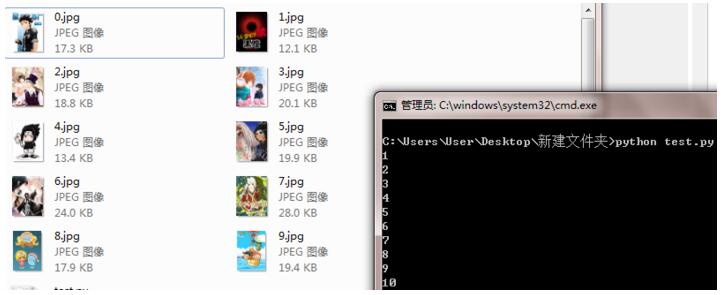
3.利用python下载百度图片
#coding=utf-8
import urllib.request
import re

def getHtml(url):
  page = urllib.request.urlopen(url)
  html = page.read()
  return html

def getImg(html):
  reg = r'src="(.+?\.jpg)"'
  imgre = re.compile(reg)
  html=html.decode('utf-8')
  imglist = re.findall(imgre,html)
  x = 0
  for imgurl in imglist:
    urllib.request.urlretrieve(imgurl,'%s.jpg' % x)
    x+=1
    print(str(x))

html = getHtml("http://image.baidu.com/channel?c=%E6%91%84%E5%BD%B1&t=%E5%85%A8%E9%83%A8&s=0")

print(getImg(html))
效果:
感谢各位的阅读!关于“python实现自动登录的方法”这篇文章就分享到这里了,希望以上内容可以对大家有一定的帮助,让大家可以学到更多知识,如果觉得文章不错,可以把它分享出去让更多的人看到吧!
免责声明:本站发布的内容(图片、视频和文字)以原创、转载和分享为主,文章观点不代表本网站立场,如果涉及侵权请联系站长邮箱:is@yisu.com进行举报,并提供相关证据,一经查实,将立刻删除涉嫌侵权内容。