
您好,登录后才能下订单哦!
密码登录
登录注册
点击 登录注册 即表示同意《亿速云用户服务条款》
这篇文章给大家分享的是有关如何使用SpringBoot+OkHttp+fastjson实现Github的OAuth第三方登录的内容。小编觉得挺实用的,因此分享给大家做个参考,一起跟随小编过来看看吧。
一、在GitHub上创建一个OAuth
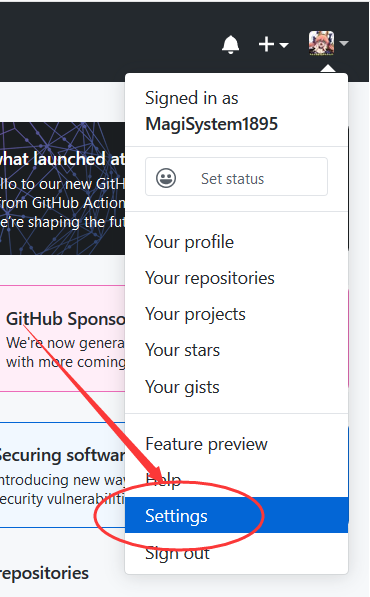
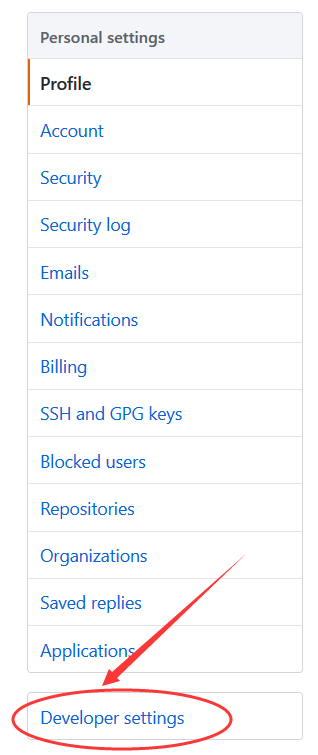

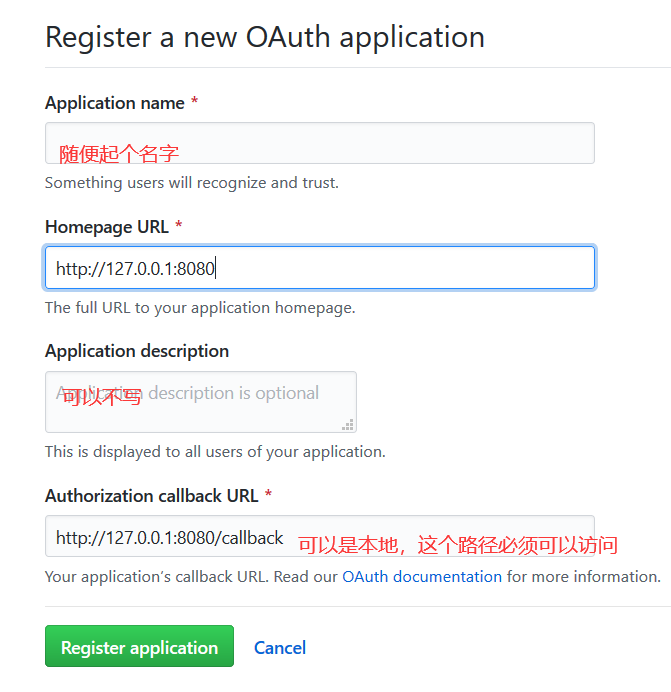
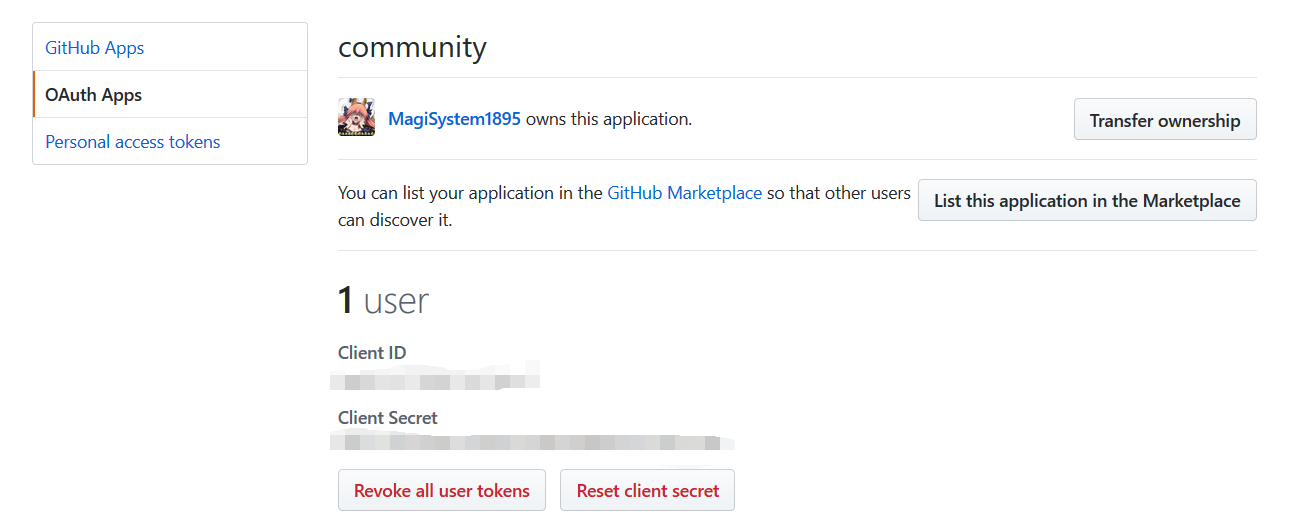
二、OAuth的原理
Spring官方文档
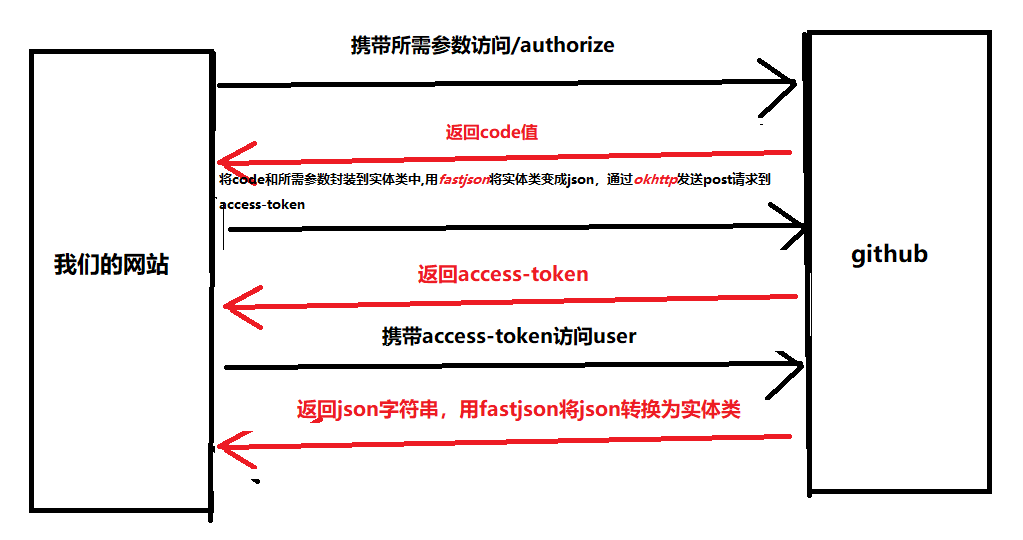
三、OkHttp的使用
OkHttp官方网站
1.Post
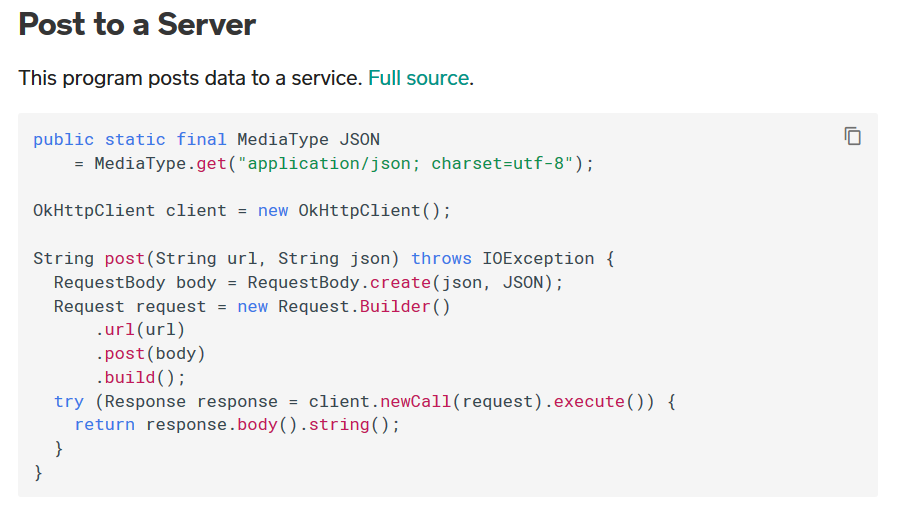
代码示例
//官方文档:    public static final MediaType JSON
//        = MediaType.get("application/json; charset=utf-8");
 MediaType mediaType = MediaType.get("application/json; charset=utf-8");//去掉前缀,并且修改MediaType对象名,因为一会使用fastjson变量会重名
 OkHttpClient client = new OkHttpClient();//第二句照抄
 RequestBody body = RequestBody.create(json,mediaType);//直接复制方法体中的内容
 Request request = new Request.Builder()
    .url("")//填写要发送请求的地址
    .post(body)
    .build();
try (Response response = client.newCall(request).execute()) {
     return response.body().string();//返回的字符串(json)
}
2.Get
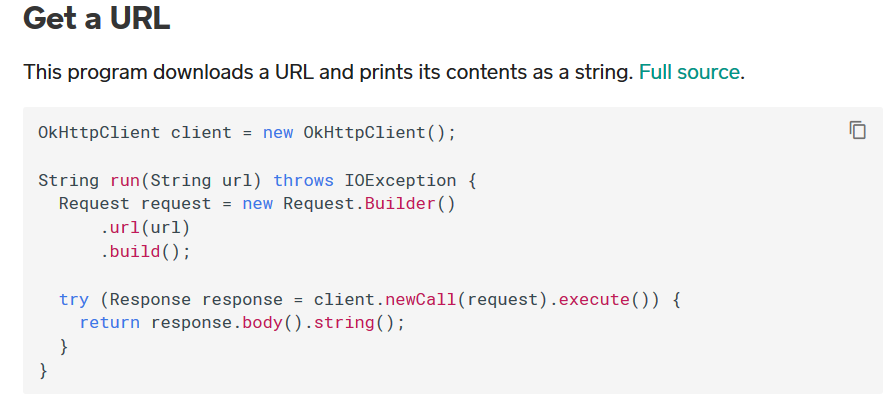
代码示例
OkHttpClient client = new OkHttpClient();//同上
 Request request = new Request.Builder()//直接复制方法体中的内容
   .url(url)//同上
   .build();

 try (Response response = client.newCall(request).execute()) {
  return response.body().string();//同上
 }
四、fastJson的使用
JSON.toJSONString(实体类)//将实体类转换为JSON字符串
JSON.parseObject(string, 实体类.class);//将JSON字符串转换为实体类
五、代码示例
前端代码
<a href="https://github.com/login/oauth/authorize?client_id=xxx&redirect_uri=http://127.0.0.1:8080/xxx&scope=user&state=1" rel="external nofollow" >Login</a>
//scope和state不写可能会报错
@Controller
public class AuthorizeController {

 @Autowired
 GithubProvider githubProvider;

 @GetMapping("/callback")
 public String callback(@RequestParam(name ="code") String code, @RequestParam(name ="state") String state){
   AccessTokenDTO accessTokenDTO = new AccessTokenDTO();
   accessTokenDTO.setClient_id("");
   accessTokenDTO.setClient\_secret("");
   accessTokenDTO.setCode(code);
   accessTokenDTO.setState(state);
   accessTokenDTO.setRedirect\_uri("https://github.com/login/oauth/access_token");
   String token = githubProvider.getAccessToken(accessTokenDTO);
   GithubUser githubUser = githubProvider.getUser(token);
   return "index";
 }

}
@Component
public class GithubProvider {
public String getAccessToken(AccessTokenDTO accessTokenDTO){
MediaType mediaType = MediaType.get("application/json; charset=utf-8");
OkHttpClient client = new OkHttpClient();
RequestBody body = RequestBody.create(JSON.toJSONString(accessTokenDTO),mediaType);//用fastjson将实体类转换为json字符串传入
Request request = new Request.Builder()
.url("https://github.com/login/oauth/access_token?cilen_id=xxx&client_secret=xxx"+accessTokenDTO.getCode()+
"&redirect_uri=http://127.0.0.1:8080/callback&state=1")
.post(body)
.build();
try (Response response = client.newCall(request).execute()) {
String string = response.body().string();
String token = string.split("&")\[0\].split("=")\[1\];
return token;
} catch (IOException e) {
e.printStackTrace();
}
return null;
}
public GithubUser getUser(String token){
OkHttpClient client = new OkHttpClient();
Request request = new Request.Builder()
.url("https://api.github.com/user?access_token="+token)
.build();
try (Response response = client.newCall(request).execute()) {
String string = response.body().string();
GithubUser githubUser = JSON.parseObject(string, GithubUser.class);//用fastjson将json字符串转换为实体类
return githubUser;
} catch (IOException e) {
e.printStackTrace();
}
return null;
}
}感谢各位的阅读!关于“如何使用SpringBoot+OkHttp+fastjson实现Github的OAuth第三方登录”这篇文章就分享到这里了,希望以上内容可以对大家有一定的帮助,让大家可以学到更多知识,如果觉得文章不错,可以把它分享出去让更多的人看到吧!
免责声明:本站发布的内容(图片、视频和文字)以原创、转载和分享为主,文章观点不代表本网站立场,如果涉及侵权请联系站长邮箱:is@yisu.com进行举报,并提供相关证据,一经查实,将立刻删除涉嫌侵权内容。