
您好,登录后才能下订单哦!
密码登录
登录注册
点击 登录注册 即表示同意《亿速云用户服务条款》
今天就跟大家聊聊有关Node.js利用Express如何实现用户注册登陆功能,可能很多人都不太了解,为了让大家更加了解,小编给大家总结了以下内容,希望大家根据这篇文章可以有所收获。
环境
准备
首先在Win10上安装Mysql,一路Next就行。安装完成使用SQLyog连接MySQL Server。连接成功需要创建数据库和数据表
Schema:
CREATE TABLE user (
username char(20) NOT NULL,
password char(20) NOT NULL,
email char(30) DEFAULT NULL,
address char(20) DEFAULT NULL,
phonenumber char(20) DEFAULT NULL,
logintime int(20) DEFAULT NULL,
id int(20) NOT NULL AUTO_INCREMENT,
PRIMARY KEY (id),
KEY username (username)
) ENGINE=InnoDB DEFAULT CHARSET=utf8
实战
前端
3个page, login.html, register.html.
index.html
<!DOCTYPE html>
<html lang="en">
	<head>
		<meta charset="UTF-8">
			<title>登陆注册</title>
			<link rel="stylesheet" type="text/css" href="/stylesheets/style.css" rel="external nofollow" rel="external nofollow" rel="external nofollow" />
		</head>
		<body>
			<a href="./register.html" rel="external nofollow" >注册</a>
			<a href="./login.html" rel="external nofollow" >登录</a>
		</body>
	</head>
</html>
login.html
<!DOCTYPE html>
<html lang="en">
	<head>
		<meta charset="UTF-8">
			<title>登陆注册</title>
			<link rel="stylesheet" type="text/css" href="/stylesheets/style.css" rel="external nofollow" rel="external nofollow" rel="external nofollow" />
		</head>
		<body>
			<form action="/login" method="GET" >
				<label for="">账号:</label>
				<input name="user" type="text" placeholder="请输入账号">
				<br>
				<label for="">密码:</label>
				<input type="password" name="password" placeholder="请输入密码">
				<br>
				<input type="submit" value="登录">
			</form>
		</body>
	</head>
</html>
register.html
<!DOCTYPE html>
<html lang="en">
	<head>
		<meta charset="UTF-8">
			<title>登陆注册</title>
			<link rel="stylesheet" type="text/css" href="/stylesheets/style.css" rel="external nofollow" rel="external nofollow" rel="external nofollow" />
		</head>
		<body>
			<form action="/register" method="POST">
				<label for="">账号:</label>
				<input name="user" type="text" placeholder="请输入账号">
				<br>
				<label for="">密码:</label>
				<input name="psw" type="password" placeholder="请输入密码">
				<br>
				<label for="">重复密码:</label>
				<input name="pswa" type="password" placeholder="请重复密码">
				<br>
				<input type="submit" value="注册">
			</form>
		</body>
	</head>
</html>
后端 server.js
var express = require("express");
var bodyParser = require("body-parser");
var router = require("./routers");

var app = express();

app.use(bodyParser.urlencoded({ extended: true }));
app.use(express.static('public'));
app.use('/', router);

module.exports = app;
Router
router/index.js, 调用封装好的数据库接口:queryUer, addUser
const express=require("express");
const dao = require("../dao/db");

const router=express.Router();

router.get("/login", function(req,res){
 console.dir(req.query);
 try{
  dao.queryUser({username:req.query.user},function(err,record){
   if(err){
    console.log(err);
    throw error;
   }
   console.log(record);
   if(record && record.password == req.query.password){
    res.send(`${req.query.user}:登陆成功`);
   }else{
    res.send(`${req.query.user}:登陆失败,检查登陆信息是否正确`);
   }
  });
 } catch(error){
  console.log(error);
  res.send(`${req.body.user}: 登陆失败`);
 }
})

router.post("/register", function(req,res){
 console.dir(req.body);
 try{
  if(req.body.psw == req.body.pswa){
   dao.addUser({username:req.body.user,password:req.body.psw});
   res.send(`${req.body.user}: 注册成功`);
  } else {
   console.log(error);
   res.send(`${req.body.user}: 注册失败:,检查登陆信息是否正确`);
  }
 } catch(error){
  console.log(error);
  res.send(`${req.body.user}: 注册失败`);
 }

})
module.exports = router;
数据库接口db.js
dao/db.js
var mysqlClient= require("./mysql");

function addUser (userInfo,callabck){
 console.log("addUser:"+ userInfo);
 var sql= `insert into user(username,password) values('${userInfo.username}','${userInfo.password}')`;
 console.log("sql:"+ sql);
 mysqlClient(sql,function(err,rows){
  if(err){
   console.log("err:"+err);
   callabck(err,null);
  } else{
   console.log("addUser result:");
   console.log(rows);
   callabck(null,rows);
  }
 })
}

function queryUser (userInfo,callabck){
 console.log("queryUser:"+ userInfo);
 var sql= `select * from user where username='${userInfo.username}'`;
 console.log("sql:"+ sql);
 mysqlClient(sql, function(err,rows){
  if(err){
   console.log("err:"+err);
   callabck(err,null);
  } else{
   rows && rows.length>0 ? callabck(null,rows[0]): callabck(null,null);
  }
 })
}
exports.addUser = addUser;
exports.queryUser = queryUser;
dao/mysql.js
const mysql = require("mysql");
const pool = mysql.createPool({
 host:"localhost",
 user:"root",
 password:"*****",
 database:"test"
});

function query(sql,callback){
 pool.getConnection(function(err,connection){
  if(err){
   callback(err,null);
   return
  }
  connection.query(sql, function (err,rows) {
   callback(err,rows);
   connection.release();
  });
 });
}

module.exports = query;
mysql module
yarn add mysql
运行index.js
cd src/ && node index.js
结果及演示
浏览器看效果及整个过程。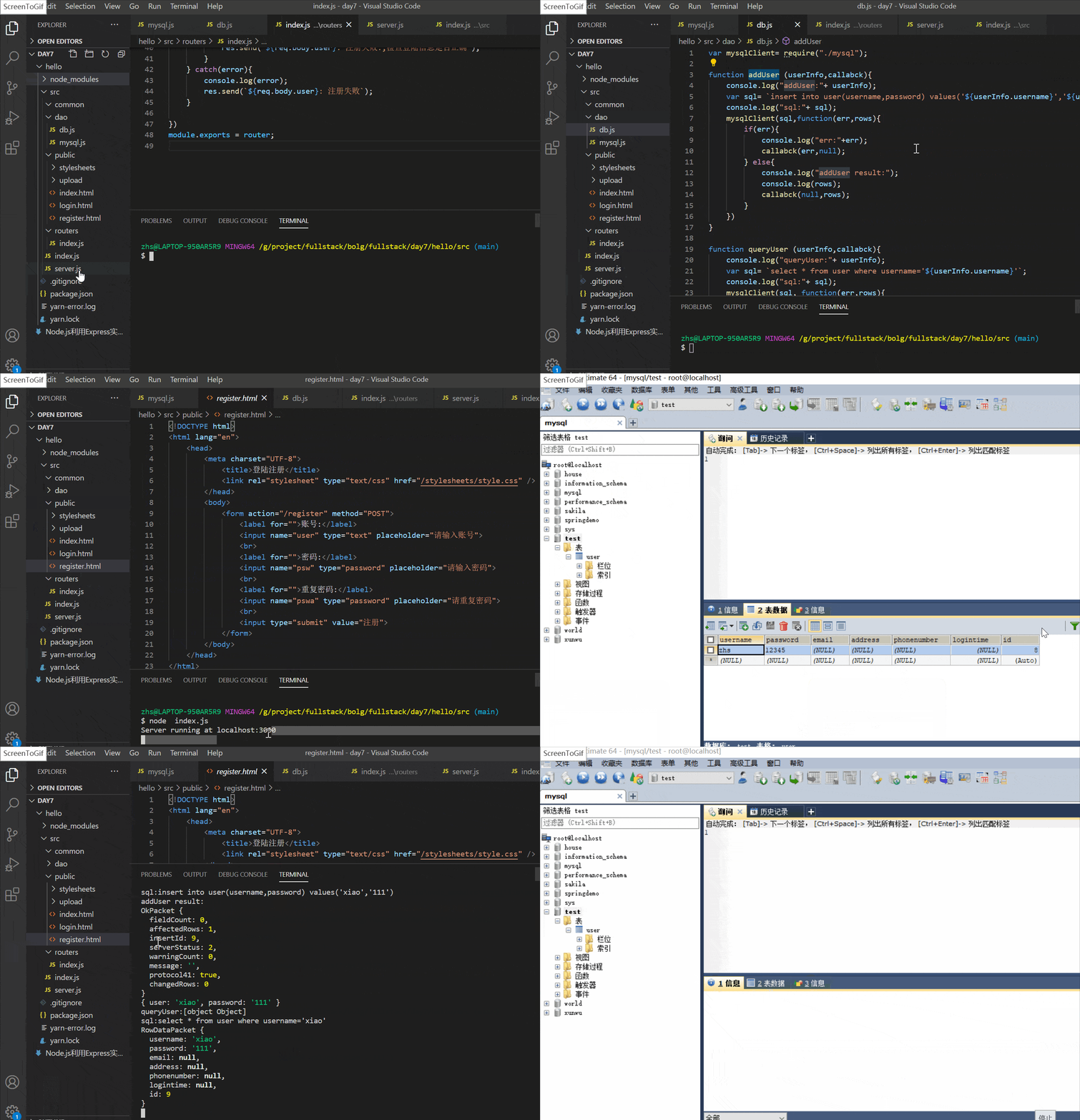
看完上述内容,你们对Node.js利用Express如何实现用户注册登陆功能有进一步的了解吗?如果还想了解更多知识或者相关内容,请关注亿速云行业资讯频道,感谢大家的支持。
免责声明:本站发布的内容(图片、视频和文字)以原创、转载和分享为主,文章观点不代表本网站立场,如果涉及侵权请联系站长邮箱:is@yisu.com进行举报,并提供相关证据,一经查实,将立刻删除涉嫌侵权内容。