
您好,登录后才能下订单哦!
密码登录
登录注册
点击 登录注册 即表示同意《亿速云用户服务条款》
这篇文章主要介绍“Security登录认证的流程是什么”的相关知识,小编通过实际案例向大家展示操作过程,操作方法简单快捷,实用性强,希望这篇“Security登录认证的流程是什么”文章能帮助大家解决问题。
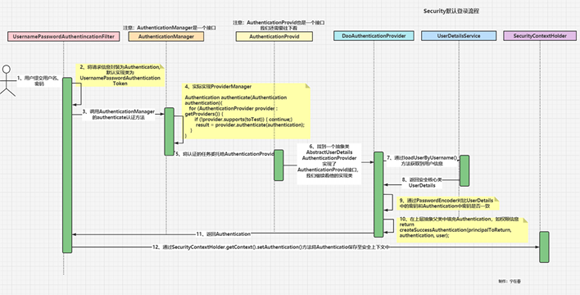
用户向/login接口使用POST方式提交用户名、密码。/login是没指定时默认的接口
请求首先会来到:????UsernamePasswordAuthenticationFilter
/**
UsernamePasswordAuthenticationFilter:处理身份验证表单提交
以及将请求信息封装为Authentication 然后返回给上层父类,
父类再通过 SecurityContextHolder.getContext().setAuthentication(authResult); 将验证过的Authentication 保存至安全上下文中
 */
public class UsernamePasswordAuthenticationFilter extends AbstractAuthenticationProcessingFilter {

	public static final String SPRING_SECURITY_FORM_USERNAME_KEY = "username";

	public static final String SPRING_SECURITY_FORM_PASSWORD_KEY = "password";

	private static final AntPathRequestMatcher DEFAULT_ANT_PATH_REQUEST_MATCHER = new AntPathRequestMatcher("/login",
			"POST");

    //可以通过对应的set方法修改
	private String usernameParameter = SPRING_SECURITY_FORM_USERNAME_KEY;
	private String passwordParameter = SPRING_SECURITY_FORM_PASSWORD_KEY;

	private boolean postOnly = true;

       //  初始化一个用户密码 认证过滤器  默认的登录uri 是 /login 请求方式是POST
	public UsernamePasswordAuthenticationFilter() {
		super(DEFAULT_ANT_PATH_REQUEST_MATCHER);
	}

	public UsernamePasswordAuthenticationFilter(AuthenticationManager authenticationManager) {
		super(DEFAULT_ANT_PATH_REQUEST_MATCHER, authenticationManager);
	}

	@Override
	public Authentication attemptAuthentication(HttpServletRequest request, HttpServletResponse response)
			throws AuthenticationException {
		if (this.postOnly && !request.getMethod().equals("POST")) {
			throw new AuthenticationServiceException("Authentication method not supported: " + request.getMethod());
		}
		String username = obtainUsername(request);
		username = (username != null) ? username : "";
		username = username.trim();
		String password = obtainPassword(request);
		password = (password != null) ? password : "";
       	//把账号名、密码封装到一个认证Token对象中,这是一个通行证,但是此时的状态时不可信的,通过认证后才会变为可信的
		UsernamePasswordAuthenticationToken authRequest = new UsernamePasswordAuthenticationToken(username, password);
		// Allow subclasses to set the "details" property
        //记录远程地址,如果会话已经存在(它不会创建),还将设置会话 ID
		setDetails(request, authRequest);
        //使用 父类中的 AuthenticationManager 对Token 进行认证
		return this.getAuthenticationManager().authenticate(authRequest);
	}

	/**
		obtainUsername和obtainPassword就是方便从request中获取到username和password
		实际上如果在前后端分离的项目中 我们大都用不上????  因为前端传过来的是JSON数据,我们通常是使用JSON工具类进行解析
	 */
	@Nullable
	protected String obtainPassword(HttpServletRequest request) {
		return request.getParameter(this.passwordParameter);
	}
	@Nullable
	protected String obtainUsername(HttpServletRequest request) {
		return request.getParameter(this.usernameParameter);
	}

	/**
		提供以便子类可以配置放入身份验证请求的详细信息
	 */
	protected void setDetails(HttpServletRequest request, UsernamePasswordAuthenticationToken authRequest) {
		authRequest.setDetails(this.authenticationDetailsSource.buildDetails(request));
	}

    /**
	...省略一些不重要的代码 set get
	*/
}将获取到的数据制作成一个令牌UsernamePasswordAuthenticationToken authRequest = new UsernamePasswordAuthenticationToken(username, password);
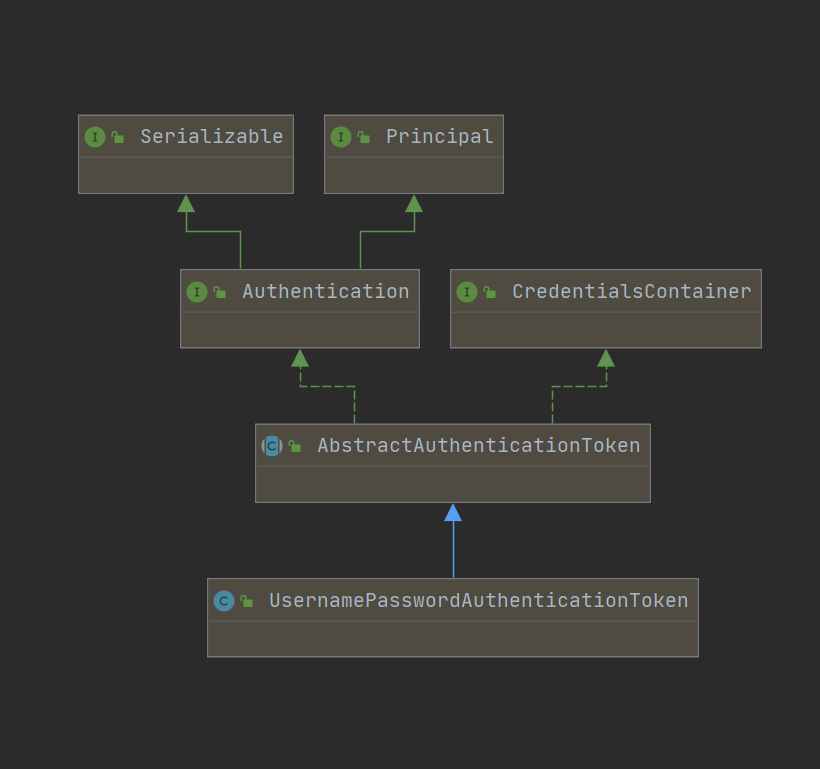
之前我们在图中讲了我们实际封装的是一个Authentication对象,UsernamePasswordAuthenticationToken是一个默认实现类。
我们简单看一下他们的结构图:
public class UsernamePasswordAuthenticationToken extends AbstractAuthenticationToken {

	private static final long serialVersionUID = SpringSecurityCoreVersion.SERIAL_VERSION_UID;

    // 这里就是用户名和密码 自定义时 根据自己需求进行重写
	private final Object principal;
	private Object credentials;

	/**
//把账号名、密码封装到一个认证UsernamePasswordAuthenticationToken对象中,这是一个通行证,但是此时的状态时不可信的,
//我们在这也可以看到 权限是null, setAuthenticated(false);是表示此刻身份是未验证的 所以此时状态是不可信的
	 */
	public UsernamePasswordAuthenticationToken(Object principal, Object credentials) {
		super(null);
		this.principal = principal;
		this.credentials = credentials;
		setAuthenticated(false);
	}

	/**	这个时候才是可信的状态 */
	public UsernamePasswordAuthenticationToken(Object principal, Object credentials,
			Collection<? extends GrantedAuthority> authorities) {
		super(authorities);
		this.principal = principal;
		this.credentials = credentials;
		super.setAuthenticated(true); // must use super, as we override
	}
	// ...
}
目前是处于未授权状态的。我们后面要做的就是对它进行认证授权。
AuthenticationManager是身份认证器,认证的核心接口
我们继续对return this.getAuthenticationManager().authenticate(authRequest);进行分析.
//我们可以看到 AuthenticationManager 实际上就是一个接口,所以它并不做真正的事情,只是提供了一个标准,我们就继续去看看它的实现类,看看是谁帮它做了事。
public interface AuthenticationManager {
    //尝试对传递的Authentication对象进行身份Authentication ,如果成功则返回完全填充的Authentication对象(包括授予的权限)。
	Authentication authenticate(Authentication authentication) throws AuthenticationException;
}我们找到ProviderManager实现了AuthenticationManager。(但是你会发现它也不做事,又交给了别人做????)
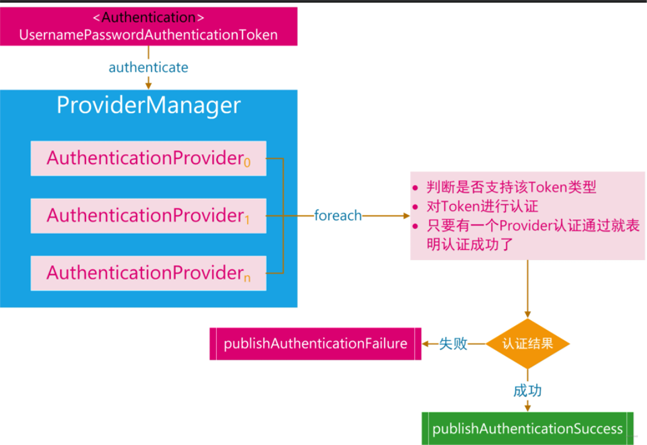
ProviderManager并不是自己直接对请求进行验证,而是将其委派给一个 AuthenticationProvider列表。列表中的每一个 AuthenticationProvider将会被依次查询是否需要通过其进行验证,每个 provider的验证结果只有两个情况:抛出一个异常或者完全填充一个 Authentication对象的所有属性。
在这个阅读中,我删除了许多杂七杂八的代码,一些判断,异常处理,我都去掉了,只针对最重要的那几个看。
public class ProviderManager implements AuthenticationManager, MessageSourceAware, InitializingBean {

    //省略了一些代码
    private List<AuthenticationProvider> providers = Collections.emptyList();

	/**
	 * 尝试对传递的Authentication对象进行身份Authentication 。AuthenticationProvider的列表将被连续尝试,
	 * 直到AuthenticationProvider表明它能够验证所传递的Authentication对象的类型。 然后将尝试使用该AuthenticationProvider 。
	 */
	@Override
	public Authentication authenticate(Authentication authentication) throws AuthenticationException {
		Class<? extends Authentication> toTest = authentication.getClass();
		Authentication result = null;
		Authentication parentResult = null;
		int currentPosition = 0;
		int size = this.providers.size();

        //我们遍历AuthenticationProvider 列表中每个Provider依次进行认证
       // 不过你会发现 AuthenticationProvider 也是一个接口,它的实现类才是真正做事的人 ,下文有
		for (AuthenticationProvider provider : getProviders()) {
			if (!provider.supports(toTest)) {
				continue;
			}
			//...
			try {
                //provider.authenticate()
                //参数:身份验证 - 身份验证请求对象。
                //返回:一个完全经过身份验证的对象,包括凭据。 如果AuthenticationProvider无法支持对传递的Authentication对象进行身份验证,则可能返回null  ,我们接着看它的实现类是什么样子的
				result = provider.authenticate(authentication);
				if (result != null) {
					copyDetails(authentication, result);
					break;
				}
			}
			catch (AccountStatusException | InternalAuthenticationServiceException ex) {
			//....
			}
		}
        // 如果 AuthenticationProvider 列表中的Provider都认证失败,且之前有构造一个 AuthenticationManager 实现类,那么利用AuthenticationManager 实现类 继续认证
		if (result == null && this.parent != null) {
			// Allow the parent to try.
			try {
				parentResult = this.parent.authenticate(authentication);
				result = parentResult;
			}
			catch (ProviderNotFoundException ex) {
			// ...
			}
		}
         //认证成功
		if (result != null) {
			if (eraseCredentialsAfterAuthentication
					&& (result instanceof CredentialsContainer)) {
				// Authentication is complete. Remove credentials and other secret data
				// from authentication
				//成功认证后删除验证信息
				((CredentialsContainer) result).eraseCredentials();
			}
            //发布登录成功事件
			eventPublisher.publishAuthenticationSuccess(result);
			return result;
		}
		// 没有认证成功,抛出异常
		if (lastException == null) {
			lastException = new ProviderNotFoundException(messages.getMessage(
					"ProviderManager.providerNotFound",
					new Object[] { toTest.getName() },
					"No AuthenticationProvider found for {0}"));
		}
		prepareException(lastException, authentication);
		throw lastException;
	}
}public interface AuthenticationProvider {
/**
认证方法
参数:身份验证 - 身份验证请求对象。
返回:一个完全经过身份验证的对象,包括凭据。
*/
Authentication authenticate(Authentication authentication) throws AuthenticationException;
/**
该Provider是否支持对应的Authentication
如果此AuthenticationProvider支持指定的Authentication对象,则返回true 。
*/
boolean supports(Class<?> authentication);
}注意:boolean supports(Class<?> authentication);方式上完整JavaDoc的注释是:
如果有多个
AuthenticationProvider都支持同一个Authentication 对象,那么第一个 能够成功验证Authentication的 Provder 将填充其属性并返回结果,从而覆盖早期支持的AuthenticationProvider抛出的任何可能的AuthenticationException。一旦成功验证后,将不会尝试后续的AuthenticationProvider。如果所有的AuthenticationProvider都没有成功验证Authentication,那么将抛出最后一个Provider抛出的AuthenticationException。(AuthenticationProvider可以在Spring Security配置类中配置)
机译不是很好理解,我们翻译成通俗易懂点:
当然有时候我们有多个不同的
AuthenticationProvider,它们分别支持不同的Authentication对象,那么当一个具体的AuthenticationProvier传进入ProviderManager的内部时,就会在AuthenticationProvider列表中挑选其对应支持的provider对相应的 Authentication对象进行验证
这个知识和实现多种登录方式相关联,我简单的说一下我的理解。
我们这里讲解的是默认的登录方式,用到的是UsernamePasswordAuthenticationFilter和UsernamePasswordAuthenticationToken以及后文中的DaoAuthenticationProvider这些,来进行身份的验证,但是如果我们后期需要添加手机短信验证码登录或者邮件验证码或者第三方登录等等。
那么我们也会重新继承AbstractAuthenticationProcessingFilter、AbstractAuthenticationToken、AuthenticationProvider进行重写,因为不同的登录方式认证逻辑是不一样的,AuthenticationProvider也会不一样,我们使用用户名和密码登录,Security 提供了一个 AuthenticationProvider的简单实现 DaoAuthenticationProvider,它使用了一个 UserDetailsService来查询用户名、密码和 GrantedAuthority,实际使用中我们都会实现UserDetailsService接口,从数据库中查询相关用户信息,AuthenticationProvider的认证核心就是加载对应的 UserDetails来检查用户输入的密码是否与其匹配。
流程图大致如下:
AuthenticationProvider它的实现类、继承类很多,我们直接看和User相关的,会先找到AbstractUserDetailsAuthenticationProvider这个抽象类。
我们先看看这个抽象类,然后再看它的实现类,看他们是如何一步一步递进的。
/**
一个基本的AuthenticationProvider ,它允许子类覆盖和使用UserDetails对象。 该类旨在响应UsernamePasswordAuthenticationToken身份验证请求。
验证成功后,将创建UsernamePasswordAuthenticationToken并将其返回给调用者。 令牌将包括用户名的String表示或从身份验证存储库返回的UserDetails作为其主体。
 */
public abstract class AbstractUserDetailsAuthenticationProvider
		implements AuthenticationProvider, InitializingBean, MessageSourceAware {

    //...省略了一些代码
	private UserCache userCache = new NullUserCache();

	private GrantedAuthoritiesMapper authoritiesMapper = new NullAuthoritiesMapper();


	//认证方法
	@Override
	public Authentication authenticate(Authentication authentication) throws AuthenticationException {
		Assert.isInstanceOf(UsernamePasswordAuthenticationToken.class, authentication,
				() -> this.messages.getMessage("AbstractUserDetailsAuthenticationProvider.onlySupports",
						"Only UsernamePasswordAuthenticationToken is supported"));
        //判断用户名是否为空
		String username = determineUsername(authentication);
		boolean cacheWasUsed = true;
        //先查缓存
		UserDetails user = this.userCache.getUserFromCache(username);
		if (user == null) {
			cacheWasUsed = false;
			try {
				user = retrieveUser(username, (UsernamePasswordAuthenticationToken) authentication);
			}
			catch (UsernameNotFoundException ex) {
				this.logger.debug("Failed to find user '" + username + "'");
				if (!this.hideUserNotFoundExceptions) {
					throw ex;
				}
				throw new BadCredentialsException(this.messages
						.getMessage("AbstractUserDetailsAuthenticationProvider.badCredentials", "Bad credentials"));
			}
			Assert.notNull(user, "retrieveUser returned null - a violation of the interface contract");
		}
		try {
            //一些检查
			this.preAuthenticationChecks.check(user);
			additionalAuthenticationChecks(user, (UsernamePasswordAuthenticationToken) authentication);
		}
		catch (AuthenticationException ex) {
			if (!cacheWasUsed) {
				throw ex;
			}
			// There was a problem, so try again after checking
			// we're using latest data (i.e. not from the cache)
			cacheWasUsed = false;
            //retrieveUser 是个没有抽象的方法 稍后我们看看它的实现类是如何实现的
			user = retrieveUser(username, (UsernamePasswordAuthenticationToken) authentication);
            //一些检查信息 用户是否可用什么的
			this.preAuthenticationChecks.check(user);
			additionalAuthenticationChecks(user, (UsernamePasswordAuthenticationToken) authentication);
		}
		this.postAuthenticationChecks.check(user);
		if (!cacheWasUsed) {
			this.userCache.putUserInCache(user);
		}
		Object principalToReturn = user;
		if (this.forcePrincipalAsString) {
			principalToReturn = user.getUsername();
		}
        //创建一个成功的Authentication对象。
		return createSuccessAuthentication(principalToReturn, authentication, user);
	}

	private String determineUsername(Authentication authentication) {
		return (authentication.getPrincipal() == null) ? "NONE_PROVIDED" : authentication.getName();
	}

	/**
		创建一个成功的Authentication对象。 这个也允许字类进行实现。
		如果要给密码加密的话,一般字类都会重新进行实现
	 */
	protected Authentication createSuccessAuthentication(Object principal, Authentication authentication,
			UserDetails user) {
		//身份信息在这里也加入进去了
		UsernamePasswordAuthenticationToken result = new UsernamePasswordAuthenticationToken(principal,
				authentication.getCredentials(), this.authoritiesMapper.mapAuthorities(user.getAuthorities()));
		result.setDetails(authentication.getDetails());
		this.logger.debug("Authenticated user");
		return result;
	}


	/**
允许子类从特定于实现的位置实际检索UserDetails ,如果提供的凭据不正确,则可以选择立即抛出AuthenticationException (如果需要以用户身份绑定到资源以获得或生成一个UserDetails )
	 */
	protected abstract UserDetails retrieveUser(String username, UsernamePasswordAuthenticationToken authentication)
			throws AuthenticationException;

    //...
}DaoAuthenticationProvider:真正做事情的人
/**
从UserDetailsService检索用户详细信息的AuthenticationProvider实现。
 */
public class DaoAuthenticationProvider extends AbstractUserDetailsAuthenticationProvider {

    // ...省略了一些代码

	/** */
	@Override
	protected final UserDetails retrieveUser(String username, UsernamePasswordAuthenticationToken authentication)
			throws AuthenticationException {
		prepareTimingAttackProtection();
		try {
            //UserDetailsService简单说就是加载对应的UserDetails的接口(一般从数据库),而UserDetails包含了更详细的用户信息
            //通过loadUserByUsername获取用户信息 ,返回一个 UserDetails
			UserDetails loadedUser = this.getUserDetailsService().loadUserByUsername(username);
			if (loadedUser == null) {
				throw new InternalAuthenticationServiceException(
						"UserDetailsService returned null, which is an interface contract violation");
			}
			return loadedUser;
		}
		catch (UsernameNotFoundException ex) {
			mitigateAgainstTimingAttack(authentication);
			throw ex;
		}
		catch (InternalAuthenticationServiceException ex) {
			throw ex;
		}
		catch (Exception ex) {
			throw new InternalAuthenticationServiceException(ex.getMessage(), ex);
		}
	}
   	// 重新父类的方法,对密码进行一些加密操作
    @Override
    protected Authentication createSuccessAuthentication(Object principal, Authentication authentication,
                                                         UserDetails user) {
        boolean upgradeEncoding = this.userDetailsPasswordService != null
            && this.passwordEncoder.upgradeEncoding(user.getPassword());
        if (upgradeEncoding) {
            String presentedPassword = authentication.getCredentials().toString();
            String newPassword = this.passwordEncoder.encode(presentedPassword);
            user = this.userDetailsPasswordService.updatePassword(user, newPassword);
        }
        return super.createSuccessAuthentication(principal, authentication, user);
    }

	//...
}UserDetailsService简单说就是定义了一个加载对应的UserDetails的接口,我们在使用中,大都数都会实现这个接口,从数据库中查询相关的用户信息。
//加载用户特定数据的核心接口。
public interface UserDetailsService {
		//根据用户名定位用户
	UserDetails loadUserByUsername(String username) throws UsernameNotFoundException;
}UserDetails也是一个接口,实际开发中,同样对它也会进行实现,进行定制化的使用。
/**
提供核心用户信息。
出于安全目的,Spring Security 不直接使用实现。 它们只是存储用户信息,然后将这些信息封装到Authentication对象中。 这允许将非安全相关的用户信息(例如电子邮件地址、电话号码等)存储在方便的位置。
 */
public interface UserDetails extends Serializable {
	//返回授予用户的权限。
	Collection<? extends GrantedAuthority> getAuthorities();
	String getPassword();
	String getUsername();

	//指示用户的帐户是否已过期。 无法验证过期帐户
	boolean isAccountNonExpired();

	//指示用户是被锁定还是未锁定。 无法对锁定的用户进行身份验证。
	boolean isAccountNonLocked();

	//指示用户的凭据(密码)是否已过期。 过期的凭据会阻止身份验证。
	boolean isCredentialsNonExpired();

	//指示用户是启用还是禁用。 无法对禁用的用户进行身份验证。
	boolean isEnabled();
}1、DaoAuthenticationProvider类下UserDetails retrieveUser()方法中通过this.getUserDetailsService().loadUserByUsername(username);获取到用户信息后;
2、将UserDetails返回给父类AbstractUserDetailsAuthenticationProvider中的调用处(即Authentication authenticate(Authentication authentication)方法中)
3、AbstractUserDetailsAuthenticationProvider拿到返回的UserDetails后,最后返回给调用者的是return createSuccessAuthentication(principalToReturn, authentication, user); 这里就是创建了一个可信的 UsernamePasswordAuthenticationToken,即身份凭证。
protected Authentication createSuccessAuthentication(Object principal, Authentication authentication,
                                                     UserDetails user) {
    UsernamePasswordAuthenticationToken result = new UsernamePasswordAuthenticationToken(principal,
                                                                                         authentication.getCredentials(), this.authoritiesMapper.mapAuthorities(user.getAuthorities()));
    result.setDetails(authentication.getDetails());
    this.logger.debug("Authenticated user");
    return result;
}4、我们再回到ProviderManager的Authentication authenticate(Authentication authentication)方法中的调用处,这个时候我们的用户信息已经是验证过的,我们接着向上层调用处返回。
5、回到UsernamePasswordAuthenticationFilter中的return this.getAuthenticationManager().authenticate(authRequest);语句中,这个时候还得继续向上层返回
6、返回到AbstractAuthenticationProcessingFilter中,我们直接按ctrl+b看是谁调用了它。
public abstract class AbstractAuthenticationProcessingFilter extends GenericFilterBean
    implements ApplicationEventPublisherAware, MessageSourceAware {
    @Override
    public void doFilter(ServletRequest request, ServletResponse response, FilterChain chain)
        throws IOException, ServletException {
        doFilter((HttpServletRequest) request, (HttpServletResponse) response, chain);
    }

    private void doFilter(HttpServletRequest request, HttpServletResponse response, FilterChain chain)
        throws IOException, ServletException {
        if (!requiresAuthentication(request, response)) {
            chain.doFilter(request, response);
            return;
        }
        try {
            // 这里就是调用处。
            Authentication authenticationResult = attemptAuthentication(request, response);
            if (authenticationResult == null) {
                // return immediately as subclass has indicated that it hasn't completed
                return;
            }
            // session相关,这里我们不深聊
            //发生新的身份验证时执行与 Http 会话相关的功能。
            this.sessionStrategy.onAuthentication(authenticationResult, request, response);
            // Authentication success
            if (this.continueChainBeforeSuccessfulAuthentication) {
                chain.doFilter(request, response);
            }
            //看方法名我们就知道 这是我们需要的拉
            //成功验证省份后调用
            successfulAuthentication(request, response, chain, authenticationResult);
        }
        catch (InternalAuthenticationServiceException failed) {
            this.logger.error("An internal error occurred while trying to authenticate the user.", failed);
            //验证失败调用
            unsuccessfulAuthentication(request, response, failed);
        }
        catch (AuthenticationException ex) {
            // Authentication failed
            //验证失败调用
            unsuccessfulAuthentication(request, response, ex);
        }
    }
}
//成功身份验证的默认行为。
//1、在SecurityContextHolder上设置成功的Authentication对象
//2、通知配置的RememberMeServices登录成功
//3、通过配置的ApplicationEventPublisher触发InteractiveAuthenticationSuccessEvent
//4、将附加行为委托给AuthenticationSuccessHandler 。
//子类可以覆盖此方法以在身份验证成功后继续FilterChain 。
protected void successfulAuthentication(HttpServletRequest request, HttpServletResponse response, FilterChain chain,
Authentication authResult) throws IOException, ServletException {
//将通过验证的Authentication保存至安全上下文
SecurityContextHolder.getContext().setAuthentication(authResult);
if (this.logger.isDebugEnabled()) {
this.logger.debug(LogMessage.format("Set SecurityContextHolder to %s", authResult));
}
this.rememberMeServices.loginSuccess(request, response, authResult);
if (this.eventPublisher != null) {
this.eventPublisher.publishEvent(new InteractiveAuthenticationSuccessEvent(authResult, this.getClass()));
}
this.successHandler.onAuthenticationSuccess(request, response, authResult);
}其实不管是验证成功调用或是失败调用,大都数我们在实际使用中,都是需要重写的,返回我们自己想要返回给前端的数据。
关于“Security登录认证的流程是什么”的内容就介绍到这里了,感谢大家的阅读。如果想了解更多行业相关的知识,可以关注亿速云行业资讯频道,小编每天都会为大家更新不同的知识点。
免责声明:本站发布的内容(图片、视频和文字)以原创、转载和分享为主,文章观点不代表本网站立场,如果涉及侵权请联系站长邮箱:is@yisu.com进行举报,并提供相关证据,一经查实,将立刻删除涉嫌侵权内容。